As populations age, medical devices are becoming practical tools for safer, more independent daily living. A hearing aid can restore conversation at a crowded kitchen table. A mobility scooter can turn a short shopping trip into a realistic choice. Remote blood-pressure monitors, continuous glucose sensors, smart medication dispensers, and fall-detection systems add support where clinical visits cannot.
This article examines the top 10 medical devices supporting aging populations. It focuses on their real-world purpose, usability, safety considerations, and potential benefits for caregivers. The discussion also considers device reliability, data privacy, clinical oversight, and accessibility for people with limited vision, hearing, or dexterity. Evidence varies. Not every device suits every older adult.
Dr. Atul Gawande, a surgeon and public-health expert, wrote, “Our job is to enable well-being, not just to ensure health and survival.” His observation captures How Medical Devices Support Aging Populations: technology should serve meaningful lives, not merely collect measurements. A wearable may detect an irregular rhythm, but it cannot understand loneliness. A sensor may identify a nighttime fall, but it cannot replace a trusted caregiver.
The strongest devices fit quietly into daily routines. They provide clear alerts, simple controls, and actionable information. Some products still create confusion, false alarms, or unnecessary dependence. That deserves honest attention. Aging support is not only about adding technology; it is about choosing tools that preserve dignity, confidence, and human connection.
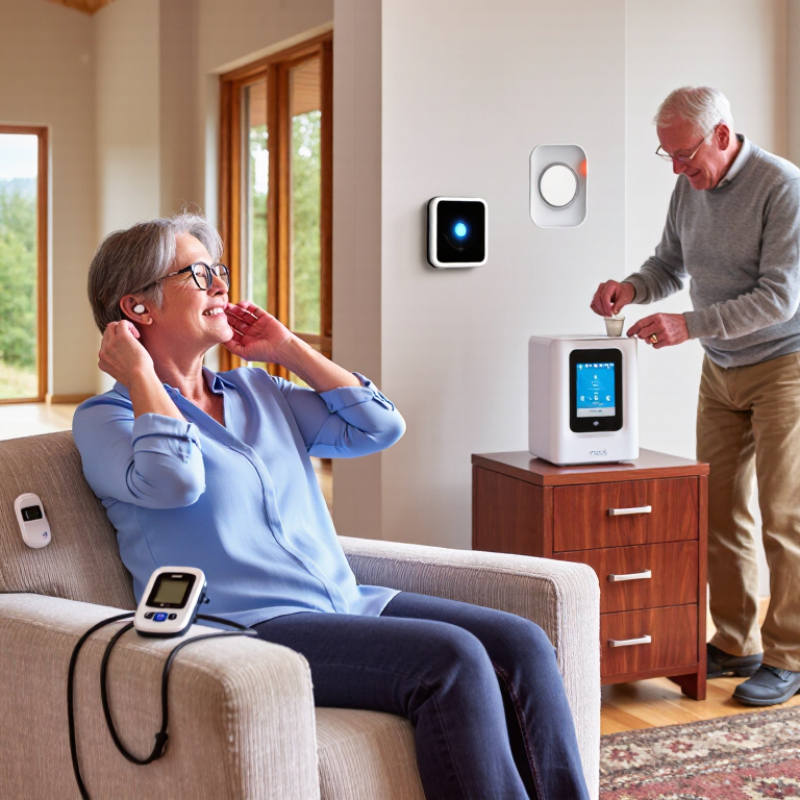
A medical device is an instrument, appliance, implant, software, or related material used for a medical purpose. The World Health Organization excludes products whose main action comes from medicines. This distinction matters. A walking aid supports movement, while a glucose monitor measures a changing health condition. Both can influence daily decisions.
Older adults often use devices to preserve independence, detect risk, or assist clinical care. Examples include hearing devices, mobility aids, fall alarms, pressure-relief cushions, and home monitoring equipment.
WHO estimates that one in six people worldwide will be aged 60 or older by 2030. Its World Report on Ageing and Health also stresses functional ability, not age alone, as a key health goal. The WHO and UNICEF Global Report on Assistive Technology (2022) estimates that more than 2.5 billion people need assistive products, with demand potentially exceeding 3.5 billion by 2050.
The role is practical.
A blood-pressure monitor may help a nurse identify an unusual reading before a routine visit. A properly fitted walker can reduce hesitation on a wet kitchen floor. Yet accuracy alone is insufficient. A device may work well in testing but confuse a person with poor vision or limited dexterity. Evidence, usability testing, staff training, and maintenance should guide selection. Privacy also requires attention when devices transmit health data. These needs are sometimes underestimated, including by experienced care teams. Reliable support depends on the person, the setting, and the device working together.
Mobility and Fall-Prevention Devices for Aging Populations
Falls are a serious health risk for older adults. The World Health Organization reports that falls cause about 684,000 deaths annually, with adults over 60 facing the greatest risk. Its Falls fact sheet also estimates 37.3 million falls require medical attention each year. Mobility devices can reduce hazards when properly selected. Canes support balance during short walks. Walkers offer wider stability. Grab bars, raised toilet seats, and non-slip flooring help manage risky transfers at home.
A device should match strength, vision, gait, and living space. A physical therapist or occupational therapist can measure cane height and check walker technique. Poor adjustment may increase tripping instead of preventing it. The CDC reports that more than one in four adults aged 65 and older falls each year in the United States. That figure makes routine assessment important, even after a “minor” stumble. I have seen people treat discomfort as normal. It is not always harmless.
Tips: Keep walking paths clear, improve hallway lighting, and use footwear with secure soles. Practice standing, turning, and sitting slowly. Replace worn rubber tips promptly. Consider a personal emergency response device for people living alone. Hip protectors may help some high-risk users, but comfort affects consistent use. No device is a perfect shield. A home assessment can reveal details that a product brochure misses. WHO and CDC guidance both support combining equipment with strength, balance, medication, and vision reviews.
| Rank | Medical Device | Primary Function | Typical Specifications and Data Dimensions | Best Suited For | Fall-Prevention Contribution | Important Safety Considerations |
|---|---|---|---|---|---|---|
| 1 | Four-Wheeled Rollator Walker | Provides walking support while allowing the user to maintain a more natural gait. |
4 wheels
Hand brakes
Seat option Common wheel diameters are approximately 6–8 inches. Typical adjustable handle heights are about 30–38 inches. Many models include a seat, backrest, basket, or pouch. |
Older adults who can walk independently but need balance support, rest breaks, or assistance on uneven indoor and outdoor surfaces. | Improves stability, provides controlled braking, and offers a built-in resting seat that can reduce fatigue-related instability. | Handles should be adjusted near wrist level when standing upright. The user should engage the brakes before sitting and avoid using the seat on slopes or uneven ground. The device should not be used as a wheelchair unless specifically designed for that purpose. |
| 2 | Standard or Two-Wheeled Walker | Maximizes stability by providing a broad, four-point support base. |
Four contact points
Fixed or front wheels Typical adjustable heights are approximately 32–39 inches. Standard walkers are usually lifted between steps; two-wheeled versions have front wheels and rear glide caps. |
People with significant balance impairment, lower-limb weakness, or limited ability to control a faster-moving rollator. | Provides a stable support frame and reduces the amount of body weight placed on the legs during walking. | All four legs or wheels must remain in contact with the floor during use. Worn rubber tips and glide caps should be replaced. Users should not pull up from the walker to stand unless it is specifically designed and positioned for that purpose. |
| 3 | Quad Cane | Offers more support than a single-point cane while remaining relatively lightweight. |
Four-point base
Adjustable height Typical base widths range from approximately 6–8 inches. Many models have push-button height adjustment and interchangeable rubber tips. |
Individuals requiring moderate one-sided balance assistance who can bear most body weight through their legs. | Creates a wider contact area with the floor and can improve balance during short-distance walking and transfers. | The larger legs should face away from the user’s foot path when appropriate. The cane should generally be held on the side opposite the weaker leg, unless directed otherwise by a clinician. Tips must remain intact and slip-resistant. |
| 4 | Single-Point Adjustable Cane | Provides light balance support and sensory feedback during walking. |
Single rubber tip
Height adjustable Typical handle heights are approximately 29–38 inches. The handle should generally align with the wrist crease when the user stands upright with the arm relaxed. |
Older adults with mild balance deficits, joint pain, or weakness on one side who do not require a walker. | Can improve confidence and provide an additional point of contact during walking on level surfaces. | A cane cannot provide the same stability as a walker. It should not be used to support full body weight unless specifically designed and clinically recommended. The rubber tip should be replaced when worn, cracked, or hardened. |
| 5 | Manual Wheelchair | Provides seated mobility when walking is unsafe, excessively tiring, or not possible. |
16–20 inch common seat widths
Rear wheels Common adult seat widths are approximately 16–20 inches, with seat depth often around 16–18 inches. Folding and rigid-frame designs are available. |
Individuals with substantial walking limitations, severe fatigue, or a high risk of falling during longer distances. | Prevents falls caused by exhaustion or unsafe ambulation and allows the user to complete essential activities while seated. | Wheel locks should be engaged during transfers. Footrests should be moved or swung away when entering or leaving the chair. A correctly fitted seat, cushion, and posture-support system are important for pressure injury and sliding prevention. |
| 6 | Transfer Bench for Bathtubs | Allows a person to sit outside the tub, move across the bench, and then lift the legs over the tub wall. |
Adjustable legs
Water-resistant seat Typical seat heights are adjustable to approximately 17–22 inches. Many designs include drainage holes, arm supports, or a sliding seat. |
People with limited leg strength, reduced balance, or difficulty stepping over a bathtub edge. | Reduces the need to step over a wet, elevated tub wall and supports controlled sitting and standing during bathing. | At least two legs should rest securely inside and outside the tub, depending on the design. The bench must be level, stable, and within its labeled weight capacity. A handheld shower and nonslip flooring are recommended; towel racks should not be used as grab supports. |
| 7 | Bathroom Grab Bars | Provide a fixed handhold for transfers, standing, sitting, and movement near toilets and bathing areas. |
Wall-mounted support
Horizontal, vertical, or angled Accessibility guidance commonly uses a gripping diameter of approximately 1¼–2 inches. Professionally installed public-accessibility grab bars are commonly designed to support about 250 pounds; residential requirements and installation methods vary. |
Older adults who need hand support near toilets, showers, tubs, and other areas where floors may become wet. | Improves controlled transfers and reduces reliance on unstable objects such as towel bars, sink edges, or shower doors. | Grab bars must be anchored into suitable wall structure or installed with an appropriately engineered reinforcement system. Suction-only bars should not be treated as permanent weight-bearing supports unless specifically rated and used as directed. |
| 8 | Stair Lift | Transports a seated user between floors along a permanently installed rail. |
Powered seat
Safety belt
Folding seat option Many systems include a swivel seat, footrest sensor, obstruction detection, remote controls, and battery backup. Weight limits are model-specific and commonly fall within approximately 250–350 pounds. |
People who cannot safely manage stairs because of weakness, pain, balance impairment, or cardiopulmonary limitations. | Removes repeated stair climbing from daily routines and lowers the risk of a stairway fall. | The seat belt should be used, and the user should remain seated with feet on the footrest. The stairway must remain clear when the device is parked. Installation and routine servicing should be completed by qualified personnel. |
| 9 | Personal Emergency Response System | Enables an older adult to request help after a fall, medical event, or other emergency. |
Wearable button
Two-way communication
Optional fall detection Systems may use a home base unit, cellular connection, GPS, or a combination of technologies. Automatic fall detection can miss some falls or generate false alarms. |
People who live alone, have a history of falls, or may be unable to reach a telephone after an emergency. | Shortens the time between a fall and assistance, which is particularly important when the user cannot stand or access a phone. | The wearable device must be worn consistently and tested according to instructions. Cellular coverage, battery status, charging habits, emergency contacts, and response-center availability should be reviewed regularly. |
| 10 | Hip Protector Garments | Reduce impact to the greater trochanter during certain sideways falls. |
Padded or shielded inserts
Wearable protection Designs may use hard shields that disperse impact or soft pads that absorb energy. Protection depends on correct positioning over the hip and consistent use. |
Older adults at elevated fracture risk, particularly those with osteoporosis, previous fractures, or recurrent falls. | May reduce the force transmitted to the hip during a direct lateral impact; effectiveness depends strongly on adherence and garment fit. | Hip protectors do not prevent falls and do not protect against every impact direction. They should fit securely without restricting movement, causing skin irritation, or interfering with toileting and dressing. |
Top 10 Medical Devices for Supporting Aging Populations
Health Monitoring and Medication-Management Devices
Aging at home becomes safer when daily health information is easy to collect. A validated upper-arm blood pressure monitor can show changes before a clinic visit. Measure at the same time, after five quiet minutes, with feet flat on the floor. Record the result, pulse, and symptoms. One reading can mislead.
A pulse oximeter may help track oxygen levels during respiratory illness, but cold fingers and poor circulation can distort results. A glucose meter supports diabetes care when used as prescribed. A digital weight scale can reveal sudden fluid gain, especially for people with heart conditions. A thermometer, fall detector, and simple activity tracker can add useful context. Small details matter. Devices should have large displays, clear alerts, and readable instructions.
Medication tools reduce avoidable confusion. Automatic pill dispensers, timed reminder systems, and locked storage can support the correct dose at the correct hour. A printed medication chart should list each medicine, strength, purpose, and prescribing clinician. Caregivers need permission and training before checking or managing medicines. Pharmacists can review duplicate therapies, confusing schedules, and possible interactions.
Technology is not perfect. A reminder cannot confirm that a tablet was swallowed. A sensor may fail during a power cut. Privacy settings also deserve attention, particularly when devices send data to family members or care teams. Keep emergency contacts visible, test alarms monthly, and ask a healthcare professional how to interpret unusual readings. Personally, I would rather see three accurate entries than a week of unreliable data.
This chart compares ten common device categories used to support aging populations. Each score represents whether the device type has a core function for health monitoring, safety alerting, or medication management. The scores describe device capabilities rather than product quality or clinical effectiveness.
Top 10 Medical Devices for Supporting Aging Populations
Sensory, Communication, and Daily-Living Assistance Devices
Aging support works best when devices match real routines, not product features alone. The WHO World Report on Hearing estimates that over 1.5 billion people live with hearing loss globally. By 2050, this number may exceed 2.5 billion. Useful options include hearing aids, personal sound amplifiers, visual alert systems, and vibrating alarm devices. Large-print digital magnifiers can help with medicine labels, bills, and food packaging. Bright screens matter in dim kitchens.
Communication needs more than clearer sound. Large-button phones, captioning tablets, speech-generating devices, and simplified video-call systems can reduce missed conversations. The United Nations World Social Report 2023 notes that more than 700 million people will be aged 65 or older by 2023, with this population rising sharply. A device should support dignity, privacy, and familiar habits. Complicated menus often fail.
Daily-living tools can reduce avoidable strain. Consider fall-detection pendants, automatic medication dispensers, shower chairs, and powered reachers. The CDC reports that millions of older adults fall each year, making home safety equipment clinically relevant. However, alerts can create false confidence. A shower chair cannot correct poor lighting or unsafe flooring. I would assess vision, hearing, balance, dexterity, and caregiver availability before choosing equipment. Professional fitting remains important. Technology helps, but it can also frustrate users when training is rushed.
Safety, Accessibility, and Selection Considerations for Older Users
Supporting older adults requires more than buying the most advanced device. A safe choice should match strength, balance, vision, hearing, memory, and home layout.
Common options include canes, walkers, wheelchairs, shower chairs, transfer benches, raised toilet seats, grab bars, blood pressure monitors, medication organizers, and emergency alert devices.
Each tool solves a different problem. A walker may improve stability but create hazards in narrow rooms. A shower chair can reduce fatigue, yet it needs firm, level flooring.
Professional assessment matters. A physiotherapist, occupational therapist, or qualified clinician can check fit, technique, and daily routines.
Measure doorways and bathroom spaces before purchasing. Check weight limits, battery status, grip comfort, and cleaning requirements. Test controls in ordinary lighting.
Choose large labels and simple alerts when vision or memory is reduced. Install grab bars into suitable structural support, not loose surfaces.
Recheck the device after illness, surgery, or a fall. Small changes can alter safe use.
Accessibility also includes dignity. Older users should handle controls independently whenever possible. A device that feels embarrassing may remain unused.
Ask the person to try it, explain concerns, and select adjustments together. Watch for slipping, skin pressure, awkward posture, or repeated confusion.
These signs need professional review. A perfect device does not exist.
Even good guidance can miss a detail in a busy home. Safety improves through observation, patient instruction, and regular reassessment.
It is an instrument, appliance, implant, software, or material used for a medical purpose. It may measure health, support movement, or assist daily care. Its main action does not come from medicine.
They can preserve independence, identify risks, and support clinical decisions. Examples include walkers, hearing devices, fall alarms, and home monitors. The person matters most.
Useful options include blood-pressure monitors, thermometers, glucose meters, and pulse oximeters. A digital scale may reveal sudden fluid gain. Record readings with symptoms and pulse.
Sit quietly for five minutes, with feet flat on the floor. Measure around the same time each day. Record the reading and pulse. One reading can mislead.
No. Cold fingers and poor circulation may distort results. Warm the hand and follow the device instructions carefully. Ask a healthcare professional about unusual readings. Technology has limits.
Timed reminders and automatic dispensers can support the correct dose and schedule. A printed chart should list each medicine, strength, purpose, and prescriber. A reminder cannot prove swallowing.
Choose large displays, clear alerts, readable instructions, and simple controls. A device may work well in testing but confuse someone with poor vision. Fit and practice matter.
Check privacy settings when health data travels to relatives or care teams. Test alarms monthly and keep emergency contacts visible. Power cuts can stop sensors. I might underestimate this risk.
How Medical Devices Support Aging Populations is a guide to the practical tools that can help older adults live more safely, independently, and comfortably. It explains how mobility aids, transfer supports, balance tools, and fall-prevention devices may improve movement and reduce everyday risks. It also highlights health-monitoring equipment that can track essential signs, support medication routines, and help users or caregivers notice changes that may require professional attention.
The article also explores devices designed to assist hearing, vision, communication, personal care, and other daily activities. Beyond functionality, it emphasizes safety, accessibility, comfort, ease of use, privacy, maintenance, and suitability for individual abilities and living environments. Choosing an appropriate device should involve the older user, caregivers, and qualified healthcare professionals when necessary. With thoughtful selection and proper instruction, medical devices can support confidence, improve daily routines, and promote greater participation while complementing—not replacing—professional medical care.

MDV Medical